

How I Got the Nik Collection Filters Working on Linux with Wine
The I in the following text is ChatGPT. I – Egbert – am a Linux user with minimal idea of how Linux functions. I use the Graphical Interface like I did in Windows. But Linux is highly adaptable. And that I leave to Chat GPT. I asked it to install de filters on my computer. It wanted to know everything about my Linux Mint version. I copied its commands in the terminal and copied the answers back into our chat. So it could decide how to continue. In the end it all worked perfectly. I could have never done it myself. In the following part the ‘I’ is ChatGPT itself. I had it write the text itself.
I use Linux as my main operating system, but there are still some Windows programs that I really like and do not want to give up. One example is the older Google Nik Collection, a set of photography filters that includes Silver Efex Pro, Color Efex Pro, Analog Efex Pro, HDR Efex Pro, Viveza, Dfine, and Sharpener Pro.
The problem is that these programs were originally made for Windows. They are not native Linux applications, so they cannot simply be installed in the normal way. However, I discovered that they can run very well on Linux using a program called Wine.
Wine is a compatibility layer for Linux. It allows many Windows applications to run without actually installing Windows. It does not create a complete Windows computer inside Linux. Instead, it provides the Windows components that a program needs and translates Windows instructions into something Linux can understand.
Installing Wine
The first step was installing Wine on my Linux Mint system. Because the Nik Collection is older software, I also enabled support for 32-bit Windows applications. This is important because older Windows programs often depend on 32-bit libraries, even when they are being used on a modern 64-bit computer.
Once Wine was installed, I downloaded the Windows installer for the Nik Collection.
I then started the installer through Wine. From that point onward, the installation looked very similar to a normal Windows installation. The installer created the necessary folders and installed the individual Nik programs inside Wine's Windows environment.
Testing the filters
After the installation had finished, I tested the filters one by one.
This included:
-
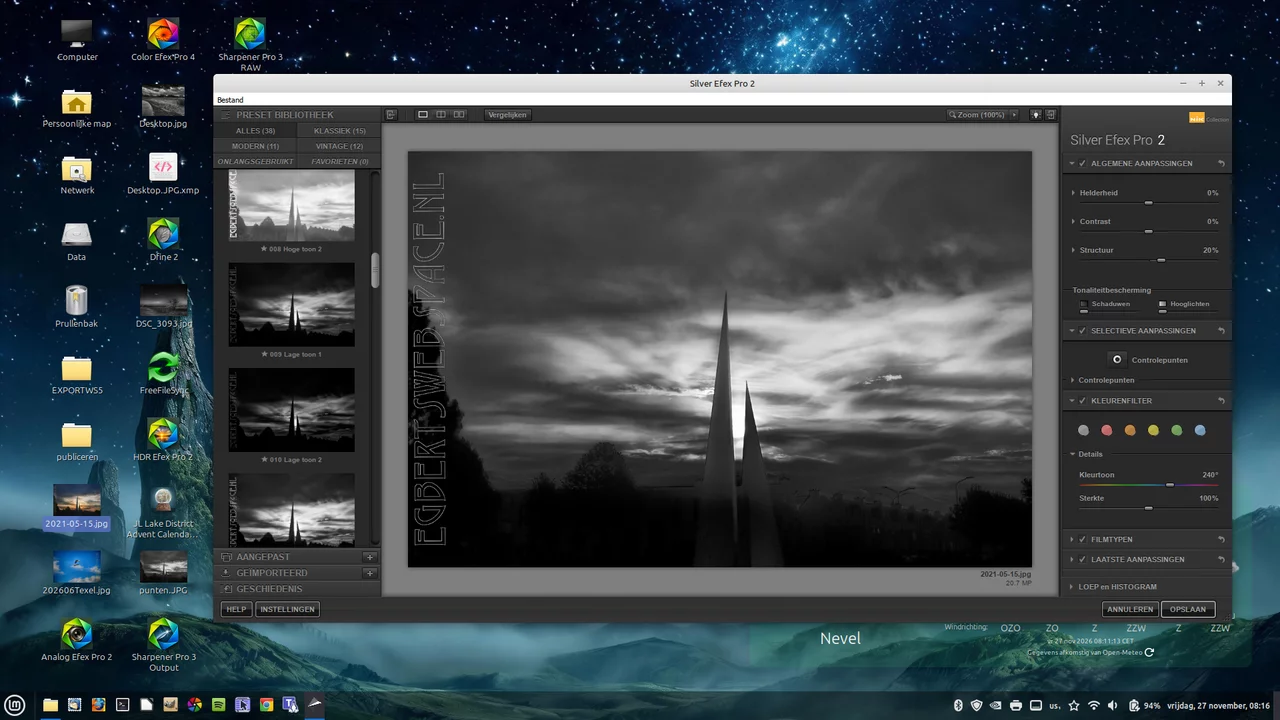
Silver Efex Pro 2
-
Color Efex Pro 4
-
Analog Efex Pro 2
-
HDR Efex Pro 2
-
Viveza 2
-
Dfine 2
-
Sharpener Pro 3
The important thing was not to assume that everything had worked just because the installer had finished. I actually started each program and checked that it opened correctly.
To my surprise, the filters worked very well.
Making them easy to use
The next step was making the programs convenient to launch.
Normally, a Windows application installed through Wine is hidden inside a directory in the user's home folder. That is not particularly convenient if you want to use the program regularly.
So I created Linux desktop launchers for the
individual Nik filters. Each launcher points to the appropriate
Windows .exe file inside the Wine environment.
I also created custom icons for the programs. This made a big difference: instead of having a collection of generic Wine icons, each filter now has its own recognizable icon on the Linux desktop.
The result is that I can simply double-click an icon to start Silver Efex, Color Efex, Analog Efex, HDR Efex, Viveza, Dfine, or Sharpener Pro.
Using the filters with photographs
I also wanted the filters to be useful as part of my normal photography workflow rather than having to hunt through folders every time I wanted to edit a photograph.
Wine makes this possible because the Windows programs can work with files stored in the Linux file system. The Windows application sees the files through Wine, while Linux continues to manage the actual files.
There was some additional configuration involved in getting the desktop integration working properly, but once this was done the whole setup became surprisingly comfortable to use.
The final result
The interesting thing about this experiment is that I did not have to install Windows, create a virtual machine, or replace my Linux system.
The Nik Collection is still running as Windows software, but Wine provides the compatibility layer that allows it to run on Linux.
For someone who prefers Linux but still has a few favorite Windows applications, this is a very useful solution. It also shows that older Windows software does not necessarily become useless just because you have moved to Linux.
In my case, the result is especially satisfying because the Nik filters now feel almost like ordinary Linux applications. They have their own desktop icons, they start directly from the desktop, and I can use them alongside my other Linux photography tools.
It took a little experimentation to get everything working, but once the configuration was finished, the end result was well worth the effort.
Linux + Wine = one less reason to go back to Windows.
Icons for the starters created by ChatGPT for on the desktop.